8.0 KiB
| title | description | keywords |
|---|---|---|
| Applications with SSL | Learn about Interlock, an application routing and load balancing system for Docker Swarm. | ucp, interlock, load balancing |
In this example we will publish a demo service to the host demo.local using SSL.
SSL Termination
In this example we will be using Docker Secrets to centrally and securely store SSL certificates in order to terminate SSL at the proxy service. Application traffic is encrypted in transport to the proxy service which terminates SSL and then uses unencrypted traffic inside the secure datacenter.

First we will generate certificates for the example:
$> openssl req \
    -new \
    -newkey rsa:4096 \
    -days 3650 \
    -nodes \
    -x509 \
    -subj "/C=US/ST=SomeState/L=SomeCity/O=Interlock/CN=demo.local" \
    -keyout demo.local.key \
    -out demo.local.cert
This should result in two files being created: demo.local.cert and demo.local.key. Next we
will use these to create Docker Secrets.
$> docker secret create demo.local.cert demo.local.cert
ywn8ykni6cmnq4iz64um1pj7s
$> docker secret create demo.local.key demo.local.key
e2xo036ukhfapip05c0sizf5w
Now we will create an overlay network so that service traffic is isolated and secure:
$> docker network create -d overlay demo
1se1glh749q1i4pw0kf26mfx5
$> docker service create \
    --name demo \
    --network demo \
    --label com.docker.lb.hosts=demo.local \
    --label com.docker.lb.port=8080 \
    --label com.docker.lb.ssl_cert=demo.local.cert \
    --label com.docker.lb.ssl_key=demo.local.key \
    ehazlett/docker-demo
6r0wiglf5f3bdpcy6zesh1pzx
Interlock will detect once the service is available and publish it. Once the tasks are running
and the proxy service has been updated the application should be available via https://demo.local.
Note: for this to work you must have an entry for demo.local in your local hosts (i.e. /etc/hosts) file.
You cannot use a host header as in other examples due to the way SNI works.
$> curl -vsk https://demo.local/ping
*   Trying 127.0.0.1...
* TCP_NODELAY set
* Connected to demo.local (127.0.0.1) port 443 (#0)
* ALPN, offering http/1.1
* Cipher selection: ALL:!EXPORT:!EXPORT40:!EXPORT56:!aNULL:!LOW:!RC4:@STRENGTH
* successfully set certificate verify locations:
*   CAfile: /etc/ssl/certs/ca-certificates.crt
  CApath: none
* TLSv1.2 (OUT), TLS handshake, Client hello (1):
* TLSv1.2 (IN), TLS handshake, Server hello (2):
* TLSv1.2 (IN), TLS handshake, Certificate (11):
* TLSv1.2 (IN), TLS handshake, Server key exchange (12):
* TLSv1.2 (IN), TLS handshake, Server finished (14):
* TLSv1.2 (OUT), TLS handshake, Client key exchange (16):
* TLSv1.2 (OUT), TLS change cipher, Client hello (1):
* TLSv1.2 (OUT), TLS handshake, Finished (20):
* TLSv1.2 (IN), TLS change cipher, Client hello (1):
* TLSv1.2 (IN), TLS handshake, Finished (20):
* SSL connection using TLSv1.2 / ECDHE-RSA-AES256-GCM-SHA384
* ALPN, server accepted to use http/1.1
* Server certificate:
*  subject: C=US; ST=SomeState; L=SomeCity; O=Interlock; CN=demo.local
*  start date: Nov  8 16:23:03 2017 GMT
*  expire date: Nov  6 16:23:03 2027 GMT
*  issuer: C=US; ST=SomeState; L=SomeCity; O=Interlock; CN=demo.local
*  SSL certificate verify result: self signed certificate (18), continuing anyway.
> GET /ping HTTP/1.1
> Host: demo.local
> User-Agent: curl/7.54.0
> Accept: */*
>
< HTTP/1.1 200 OK
< Server: nginx/1.13.6
< Date: Wed, 08 Nov 2017 16:26:55 GMT
< Content-Type: text/plain; charset=utf-8
< Content-Length: 92
< Connection: keep-alive
< Set-Cookie: session=1510158415298009207; Path=/; Expires=Thu, 09 Nov 2017 16:26:55 GMT; Max-Age=86400
< x-request-id: 4b15ab2aaf2e0bbdea31f5e4c6b79ebd
< x-proxy-id: a783b7e646af
< x-server-info: interlock/2.0.0-development (147ff2b1) linux/amd64
< x-upstream-addr: 10.0.2.3:8080

{"instance":"c2f1afe673d4","version":"0.1",request_id":"7bcec438af14f8875ffc3deab9215bc5"}
Since the certificate and key is stored securely in Swarm you can safely scale this service as well as the proxy service and Swarm will handle granting access to the credentials only as needed.
SSL Passthrough
In this example we will be using SSL passthrough to ensure encrypted communication from the request to the application service. This ensures maximum security as there is no unencrypted transport.
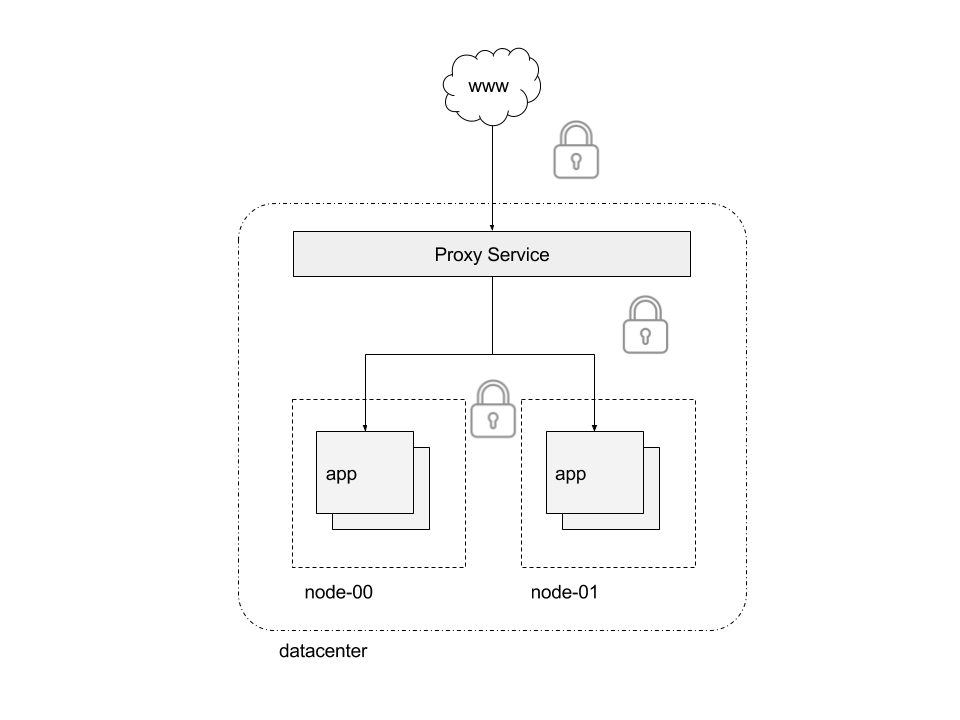
First we will generate certificates for our application:
$> openssl req \
    -new \
    -newkey rsa:4096 \
    -days 3650 \
    -nodes \
    -x509 \
    -subj "/C=US/ST=SomeState/L=SomeCity/O=Interlock/CN=demo.local" \
    -keyout app.key \
    -out app.cert
This should result in two files being created: app.cert and app.key. Next we
will use these to create Docker Secrets.
$> docker secret create app.cert app.cert
ywn8ykni6cmnq4iz64um1pj7s
$> docker secret create app.key app.key
e2xo036ukhfapip05c0sizf5w
Now we will create an overlay network so that service traffic is isolated and secure:
$> docker network create -d overlay demo
1se1glh749q1i4pw0kf26mfx5
$> docker service create \
    --name demo \
    --network demo \
    --detach=false \
    --secret source=app.cert,target=/run/secrets/cert.pem \
    --secret source=app.key,target=/run/secrets/key.pem \
    --label com.docker.lb.hosts=demo.local \
    --label com.docker.lb.port=8080 \
    --label com.docker.lb.ssl_passthrough=true \
    --env METADATA="demo-ssl-passthrough" \
    ehazlett/docker-demo --tls-cert=/run/secrets/cert.pem --tls-key=/run/secrets/key.pem
Interlock will detect once the service is available and publish it. Once the tasks are running
and the proxy service has been updated the application should be available via https://demo.local.
Note: for this to work you must have an entry for demo.local in your local hosts (i.e. /etc/hosts) file.
You cannot use a host header as in other examples due to the way SNI works.
$> curl -vsk https://demo.local/ping
*   Trying 127.0.0.1...
* TCP_NODELAY set
* Connected to demo.local (127.0.0.1) port 443 (#0)
* ALPN, offering http/1.1
* Cipher selection: ALL:!EXPORT:!EXPORT40:!EXPORT56:!aNULL:!LOW:!RC4:@STRENGTH
* successfully set certificate verify locations:
*   CAfile: /etc/ssl/certs/ca-certificates.crt
  CApath: none
* TLSv1.2 (OUT), TLS handshake, Client hello (1):
* TLSv1.2 (IN), TLS handshake, Server hello (2):
* TLSv1.2 (IN), TLS handshake, Certificate (11):
* TLSv1.2 (IN), TLS handshake, Server key exchange (12):
* TLSv1.2 (IN), TLS handshake, Server finished (14):
* TLSv1.2 (OUT), TLS handshake, Client key exchange (16):
* TLSv1.2 (OUT), TLS change cipher, Client hello (1):
* TLSv1.2 (OUT), TLS handshake, Finished (20):
* TLSv1.2 (IN), TLS change cipher, Client hello (1):
* TLSv1.2 (IN), TLS handshake, Finished (20):
* SSL connection using TLSv1.2 / ECDHE-RSA-AES128-GCM-SHA256
* ALPN, server accepted to use http/1.1
* Server certificate:
*  subject: C=US; ST=SomeState; L=SomeCity; O=Interlock; CN=demo.local
*  start date: Nov  8 16:39:45 2017 GMT
*  expire date: Nov  6 16:39:45 2027 GMT
*  issuer: C=US; ST=SomeState; L=SomeCity; O=Interlock; CN=demo.local
*  SSL certificate verify result: self signed certificate (18), continuing anyway.
> GET /ping HTTP/1.1
> Host: demo.local
> User-Agent: curl/7.54.0
> Accept: */*
>
< HTTP/1.1 200 OK
< Connection: close
< Set-Cookie: session=1510159255159600720; Path=/; Expires=Thu, 09 Nov 2017 16:40:55 GMT; Max-Age=86400
< Date: Wed, 08 Nov 2017 16:40:55 GMT
< Content-Length: 78
< Content-Type: text/plain; charset=utf-8
<
{"instance":"327d5a26bc30","version":"0.1","metadata":"demo-ssl-passthrough"}
Application traffic will travel securely fully encrypted from the request all the way to the application service. Notice that Interlock cannot add the metadata response headers (version info, request ID, etc) as this is using TCP passthrough and cannot add the metadata.