59 KiB
| description | keywords | title |
|---|---|---|
| Run certification tests against your images | Docker, docker, store, certified content, images | Certify Docker images |
Introduction
Content that qualifies as Docker Certified must conform to best practices and pass certain baseline tests.
Docker Store lets you publish certified images as well as plugins for logging, volumes, and networks. You must certify your own images and logging plugins with the inspect tools as explained in these docs. Currently, Docker Store certifies your volume and networking plugins for you upon submission.
This page explains how publishers can successfully test their Docker images. Also available: Certify your Docker logging plugins.
Content that requires a non-certified infrastructure environment cannot be published as certified.
Certify your Docker images
You must use the tool, inspectDockerimage, to certify your content for publication on Docker Store by ensuring that your images conform to best practices. Download the tool here.
The inspectDockerimage tool does the following:
-
Verifies that the Docker image was built from an image in the Docker Official Repository
-
Inspects the Docker image for a Health Check. Although a Health Check is not required, it is recommended.
-
Checks if a Linux Docker image is running
supervisordto launch multiple services.Running
supervisordin a container is not a best practice for images destined for Doctor Store. The recommended best practice is to split the multiple services into separate Docker images and run them in separate containers. -
Attempts to start a container from the Docker image to ensure that the image is functional.
-
Displays the running processes in the container.
-
Checks the running processes to see if any are running
supervisord. -
Verifies that the container is sending logs to
stdout/stderr. -
Attempts to stop the container to ensure that it can be stopped gracefully.
Prerequisites
Your Docker EE installation must be running on the server used to verify your submissions. If necessary, request entitlement to a specific Docker Enterprise Edition.
- Docker EE (on the server for verifying submissions)
- git client
- inspectDockerimage tool
Set up testing environment
There are three steps: (1) install git, (2) configure credentials, and (3) configure endpoints (or use default endpoints).
-
Install git (required for
inspectDockerimage):Ubuntu
sudo apt-get update -qq
sudo apt-get install git -y
RHEL/CentOS
sudo yum makecache fast
sudo yum install git -y
Windows
To download and install git for Windows: https://git-scm.com/download/win.
-
Configure your Docker Registry credentials by either defining environment variables or passing them as arguments to
inspectDockerimage.a. Define environment variables for registry credentials,
DOCKER_USERandDOCKER_PASSWORD:Linux
export DOCKER_USER="my_docker_registry_user_account"
export DOCKER_PASSWORD="my_docker_registry_user_account_password"
Windows command prompt
set DOCKER_USER="my_docker_registry_user_account"
set DOCKER_PASSWORD="my_docker_registry_user_account_password"
Windows powershell
$env:DOCKER_USER="my_docker_registry_user_account"
$env:DOCKER_PASSWORD="my_docker_registry_user_account_password"
b. Pass arguments to
inspectDockerimage(or be prompted for them):--docker-user --docker-password -
Configure endpoints (and override default values) by either defining environment variables or passing them as arguments to
inspectDockerimage.By default,
inspectDockerimageuses these two endpoints to communicate with the Docker Hub Registry:- Registry Authentication Endpoint: https://auth.docker.io
- Registry API Endpoint: https://registry-1.docker.io
You may want to use your private registry for initial testing and override the defaults.
a. Define environment variables,
DOCKER_REGISTRY_AUTH_ENDPOINTandDOCKER_REGISTRY_API_ENDPOINT:Linux or MacOS
export DOCKER_REGISTRY_AUTH_ENDPOINT="https://my_docker_registry_authentication_endpoint"
export DOCKER_REGISTRY_API_ENDPOINT="https://my_docker_registry_api_enpoint"
Windows command prompt
set DOCKER_REGISTRY_AUTH_ENDPOINT="https://my_docker_registry_authentication_endpoint"
set DOCKER_REGISTRY_API_ENDPOINT="https://my_docker_registry_api_enpoint"
Windows powershell
$env:DOCKER_REGISTRY_AUTH_ENDPOINT="https://my_docker_registry_authentication_endpoint"
$env:DOCKER_REGISTRY_API_ENDPOINT="https://my_docker_registry_api_enpoint"
b. Pass your endpoints as arguments to
inspectDockerimage:--docker-registry-auth-endpoint --docker-registry-api-endpoint
Syntax
-
Download
inspectDockerimagecommand. -
Set permissions on
inspectDockerImageso that it is executable:chmod u+x inspectDockerImage -
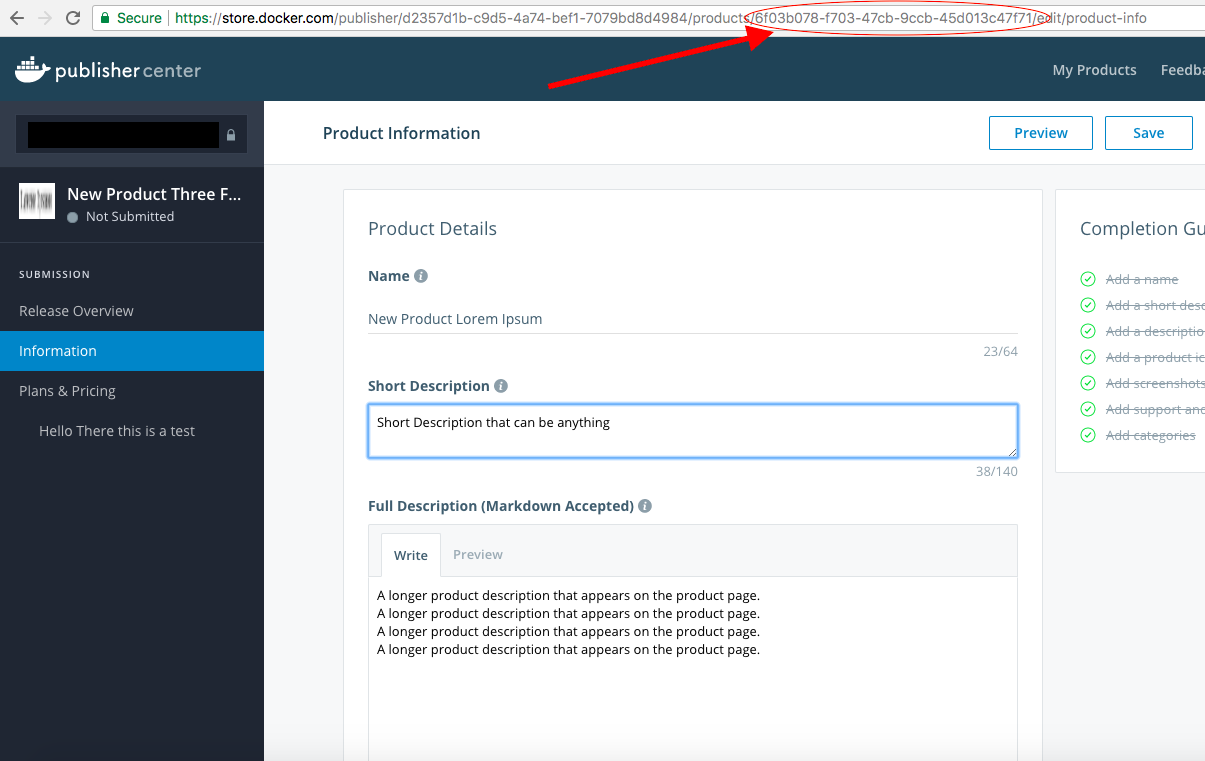
Capture the product ID (from the URL in Docker Store) that you want to reference for the certification test.
Inspects a Docker image to see if it conforms to best practices.

Syntax: inspectDockerimage [options] dockerimage

Options:
  -docker-password string
    	 Docker Password.  This overrides the DOCKER_PASSWORD environment variable.
  -docker-registry-api-endpoint string
    	 Docker Registry API Endpoint. This overrides the DOCKER_REGISTRY_API_ENDPOINT environment variable. (default "https://registry-1.docker.io")
  -docker-registry-auth-endpoint string
    	 Docker Registry Authentication Endpoint. This overrides the DOCKER_REGISTRY_AUTH_ENDPOINT environment variable. (default "https://auth.docker.io")
  -docker-user string
    	 Docker User ID.  This overrides the DOCKER_USER environment variable.
  -help
    	 Displays the command help.
  -html
    	 Generate HTML output.
  -json
    	 Generate JSON output.
  -log-tail int
    	Number of lines to show from the end of the container logs. (default 20)
  -product-id string
    	 Optional Product identifier from Docker Store for this image. Please include it when you want the output to be sent to docker store.
  -start-script string
    	 An optional custom script used to start the Docker container. The script will get passed one argument, the name of the Docker image.
  -start-wait-time int
    	 Number of seconds to wait for the Docker container to start. (default 30)
  -stop-wait-time int
    	 Number of seconds to wait for the Docker container to respond to the stop before killing it. (default 60)

dockerimage
The Docker image to inspect. This argument is required.
Inspection Output
By default, inspectDockerimage displays output locally to stdout (the default), JSON, and HTML. You can also upload output to Docker Store, which is recommended for administrator verification.
-
Upload to Docker Store (by entering
product-idat the commandline). -
Send message to
stdout. This is the default. -
JSON sent to
stdout. Use the--jsonoption to override and replace the messages sent tostdout. -
HTML local file. Use the
--htmloption to generate an HTML report. Both--jsonand--htmlcan be specified at the same time.
Volumes created by Docker image containers are destroyed after
inspectDockerimageterminates.
Inspection Examples
This section demonstrates how to inspect your Linux and Windows images.
- Inspect a Linux Docker image with custom startup script
- Inspect a Linux Docker image with JSON output
- Inspect a Linux Docker image with HTML output
- Inspect a Microsoft Windows Docker image
Inspect a Linux Docker image with a custom startup script
The inspectDockerImage command expects a custom script to return the container ID (or container name) from the docker image being tested as the last or only line of output to stdout. Without the container ID or container name as the last line of output, the inspection fails.
A simple custom script that executes a docker container run command, easily outputs the container ID. But a complex script might need testing to ensure it also returns the container ID or container name as the last line of output -- for example, a script that launches multiple containers, or one that runs docker-compose.
Some "testing/helper" scripts are available for testing Linux and Windows Docker images on virtual machines running in Amazon. Refer to Test and Helper Scripts
Example startup script
cat ./run_my_application.sh
#!/usr/bin/env bash
docker container run -d \
-p 80:8080 --name tomcat-wildbook \
--link mysql-wildbook \
$1
To inspect the Docker image, gforghetti/tomcat-wildbook:latest, with a custom startup script:
root:[~/] # ./inspectDockerimage --start-script ./run_my_application.sh gforghetti/tomcat-wildbook:latest
Output:
*******************************************************************************************************************************************************************************************************
* Docker image: gforghetti/tomcat-wildbook:latest
*******************************************************************************************************************************************************************************************************
*******************************************************************************************************************************************************************************************************
* Step #1 Loading information on the Docker official base images ...
*******************************************************************************************************************************************************************************************************
The Docker official base images data has been loaded from the docker_official_base_images.json file. Last updated on Fri Oct 27 08:35:14 2017
*******************************************************************************************************************************************************************************************************
* Step #2 Inspecting the Docker image "gforghetti/tomcat-wildbook:latest" ...
*******************************************************************************************************************************************************************************************************
Pulling the Docker image gforghetti/tomcat-wildbook:latest ...
Pulling the Docker image took 13.536641265s
Passed: Docker image "gforghetti/tomcat-wildbook:latest" has been inspected.
*******************************************************************************************************************************************************************************************************
* Step #3 Docker image information
*******************************************************************************************************************************************************************************************************
+---------------------------+-------------------------------------------------------------------------------------------------------------------------------------------------------------------------+
| Docker image: | gforghetti/tomcat-wildbook:latest |
| Size: | 384MB |
| Layers: | 39 |
| Digest: | sha256:58715d538bba0782f55fa64dede776a2967c08873cd66424bb5a7156734c781e |
| Base layer digest: | sha256:06b22ddb19134ec8c42aaabd3e2e9f5b378e4e53da4a8960eaaaa86351190af3 |
| Official base image: | debian:stretch@sha256:6ccbcbf362dbc4add74711cb774751b59cdfd7aed16c3c29aaecbea871952fe0 |
| Created on: | 2017-08-16T21:39:24 |
| Docker version: | 17.07.0-ce-rc2 |
| Maintainer: | Gary Forghetti, Docker Inc. |
| Operating system: | linux |
| Operating system version: | Debian GNU/Linux 9 (stretch) |
| Architecture: | amd64 |
| User: | |
| WorkingDir: | /usr/local/tomcat |
| Entrypoint: | |
| Cmd: | /usr/local/tomcat/bin/catalina.sh run |
| Shell: | |
| Env: | PATH=/usr/local/tomcat/bin:/usr/local/sbin:/usr/local/bin:/usr/sbin:/usr/bin:/sbin:/bin |
| Env: | LANG=C.UTF-8 |
| Env: | JAVA_HOME=/docker-java-home/jre |
| Env: | JAVA_VERSION=8u141 |
| Env: | JAVA_DEBIAN_VERSION=8u141-b15-1~deb9u1 |
| Env: | CA_CERTIFICATES_JAVA_VERSION=20170531+nmu1 |
| Env: | CATALINA_HOME=/usr/local/tomcat |
| Env: | TOMCAT_NATIVE_LIBDIR=/usr/local/tomcat/native-jni-lib |
| Env: | LD_LIBRARY_PATH=/usr/local/tomcat/native-jni-lib |
| Env: | OPENSSL_VERSION=1.1.0f-3 |
| Env: | GPG_KEYS=05AB33110949707C93A279E3D3EFE6B686867BA6 07E48665A34DCAFAE522E5E6266191C37C037D42 47309207D818FFD8DCD3F83F1931D684307A10A5 541FBE7D8F78B25E055DDEE13C370389288 |
| Env: | TOMCAT_MAJOR=8 |
| Env: | TOMCAT_VERSION=8.5.20 |
| Env: | TOMCAT_TGZ_URL=https://www.apache.org/dyn/closer.cgi?action=download&filename=tomcat/tomcat-8/v8.5.20/bin/apache-tomcat-8.5.20.tar.gz |
| Env: | TOMCAT_ASC_URL=https://www.apache.org/dist/tomcat/tomcat-8/v8.5.20/bin/apache-tomcat-8.5.20.tar.gz.asc |
| Env: | TOMCAT_TGZ_FALLBACK_URL=https://archive.apache.org/dist/tomcat/tomcat-8/v8.5.20/bin/apache-tomcat-8.5.20.tar.gz |
| Env: | TOMCAT_ASC_FALLBACK_URL=https://archive.apache.org/dist/tomcat/tomcat-8/v8.5.20/bin/apache-tomcat-8.5.20.tar.gz.asc |
| ExposedPorts: | 8080/tcp |
| Healthcheck: | |
| Volumes: | |
+---------------------------+-------------------------------------------------------------------------------------------------------------------------------------------------------------------------+
*******************************************************************************************************************************************************************************************************
* Step #4 Docker image layer information
*******************************************************************************************************************************************************************************************************
+----------+-------+------------------------------------------------------------------------------------------------------+------------+----------+---------------------------------------------------+
| Manifest | Layer | Command | Size | Blob | Matches |
+----------+-------+------------------------------------------------------------------------------------------------------+------------+----------+---------------------------------------------------+
| 58715d53 | 1 | /bin/sh -c #(nop) ADD file:ebba725fb97cea45d0b1b35ccc8144e766fcfc9a78530465c23b0c4674b14042 in / | 43.1 Mib | 06b22ddb | debian:stretch@6ccbcbf3 |
| 58715d53 | 3 | /bin/sh -c apt-get update && apt-get install -y --no-install-recommends ca-certificates curl wget && | 10.6 Mib | 336c28b4 | |
| 58715d53 | 4 | /bin/sh -c set -ex; if ! command -v gpg > /dev/null; then apt-get update; apt-get install -y --no-in | 4.2 Mib | 1f3e6b8d | |
| 58715d53 | 5 | /bin/sh -c apt-get update && apt-get install -y --no-install-recommends bzip2 unzip xz-utils && rm - | 614.7 Kib | aeac5951 | |
| 58715d53 | 7 | /bin/sh -c { echo '#!/bin/sh'; echo 'set -e'; echo; echo 'dirname "$(dirname "$(readlink -f "$(which | 241 Bytes | b01db8bd | |
| 58715d53 | 8 | /bin/sh -c ln -svT "/usr/lib/jvm/java-8-openjdk-$(dpkg --print-architecture)" /docker-java-home | 130 Bytes | f7f398af | |
| 58715d53 | 13 | /bin/sh -c set -ex; if [ ! -d /usr/share/man/man1 ]; then mkdir -p /usr/share/man/man1; fi; apt-get | 52.1 Mib | 1c5595fa | |
| 58715d53 | 14 | /bin/sh -c /var/lib/dpkg/info/ca-certificates-java.postinst configure | 265.6 Kib | e1a6cc83 | |
| 58715d53 | 17 | /bin/sh -c mkdir -p "$CATALINA_HOME" | 144 Bytes | 9efe1c93 | |
| 58715d53 | 23 | /bin/sh -c apt-get update && apt-get install -y --no-install-recommends libapr1 openssl="$OPENSSL_VE | 220.4 Kib | eef936b7 | |
| 58715d53 | 25 | /bin/sh -c set -ex; for key in $GPG_KEYS; do gpg --keyserver ha.pool.sks-keyservers.net --recv-keys | 109.6 Kib | 3c1e7106 | |
| 58715d53 | 32 | /bin/sh -c set -x && { wget -O tomcat.tar.gz "$TOMCAT_TGZ_URL" || wget -O tomcat.tar.gz "$TOMCAT_TGZ | 9.6 Mib | e87d3364 | |
| 58715d53 | 33 | /bin/sh -c set -e && nativeLines="$(catalina.sh configtest 2>&1)" && nativeLines="$(echo "$nativeLin | 128 Bytes | 8ecc2c09 | |
| 58715d53 | 39 | /bin/sh -c #(nop) COPY file:85450fd5b81b7fda5dbbe405f312952d9e786888200ed5fb92171458853e50f7 in /usr | 87.5 Mib | 74329547 | |
+----------+-------+------------------------------------------------------------------------------------------------------+------------+----------+---------------------------------------------------+
*******************************************************************************************************************************************************************************************************
* Step #5 Docker image inspection results
*******************************************************************************************************************************************************************************************************
Passed: Docker image was built from the official Docker base image "debian:stretch".
Warning: Docker image was not built using Docker Enterprise Edition!
Passed: Docker image metadata contains a Maintainer.
Warning: Docker image does not contain a Healthcheck! Although a Healthcheck is not required, it is recommended.
Passed: Docker image Cmd attribute is not running supervisord.
Passed: Docker image Entrypoint attribute is not running supervisord.
*******************************************************************************************************************************************************************************************************
* Step #6 Attempting to start a container from the Docker image "gforghetti/tomcat-wildbook:latest" ...
*******************************************************************************************************************************************************************************************************
Passed: Docker container with the container id aea5d97925c7035e0037ccc79723fd534a26cbb8be2a124e0257b3a8c3fca55f was started.
*******************************************************************************************************************************************************************************************************
* Step #7 Waiting 30 seconds to give the container time to initialize...
*******************************************************************************************************************************************************************************************************
Wait time expired, continuing.
*******************************************************************************************************************************************************************************************************
* Step #8 Checking to see if the container is still running.
*******************************************************************************************************************************************************************************************************
Passed: Docker container with the container id aea5d97925c7035e0037ccc79723fd534a26cbb8be2a124e0257b3a8c3fca55f is running.
*******************************************************************************************************************************************************************************************************
* Step #9 Displaying the running processes in the Docker container
*******************************************************************************************************************************************************************************************************
Passed: Docker container has 1 running process.
UID PID PPID C STIME TTY TIME CMD
root 2609 2592 42 12:59 ? 00:00:12 /docker-java-home/jre/bin/java -Djava.util.logging.config.f
*******************************************************************************************************************************************************************************************************
* Step #10 Checking if supervisord is running in the Docker container
*******************************************************************************************************************************************************************************************************
Passed: Docker container is not running supervisord.
*******************************************************************************************************************************************************************************************************
* Step #11 Displaying Docker container resource usage statistics
*******************************************************************************************************************************************************************************************************
Passed: Docker container resource usage statistics were retrieved.
CPU % MEM % MEM USAGE / LIMIT BLOCK I/O NET I/O PIDS
0.69% 5.26% 844.4MiB / 15.67GiB 1.67MB / 0B 1.17kB / 1.28kB 50
*******************************************************************************************************************************************************************************************************
* Step #12 Displaying the logs from the Docker container (last 20 lines)
*******************************************************************************************************************************************************************************************************
Passed: Docker container logs were retrieved.
2017-10-27T12:59:57.839970103Z
2017-10-27T12:59:57.965093247Z 27-Oct-2017 12:59:57.964 INFO [localhost-startStop-1] org.apache.catalina.startup.HostConfig.deployWAR Deployment of web application archive [/usr/local/tomcat/webapps
2017-10-27T12:59:57.966178465Z 27-Oct-2017 12:59:57.965 INFO [localhost-startStop-1] org.apache.catalina.startup.HostConfig.deployDirectory Deploying web application directory [/usr/local/tomcat/web
2017-10-27T12:59:58.051675791Z 27-Oct-2017 12:59:58.050 INFO [localhost-startStop-1] org.apache.catalina.startup.HostConfig.deployDirectory Deployment of web application directory [/usr/local/tomcat
2017-10-27T12:59:58.051695596Z 27-Oct-2017 12:59:58.051 INFO [localhost-startStop-1] org.apache.catalina.startup.HostConfig.deployDirectory Deploying web application directory [/usr/local/tomcat/web
2017-10-27T12:59:58.063373978Z 27-Oct-2017 12:59:58.063 INFO [localhost-startStop-1] org.apache.catalina.startup.HostConfig.deployDirectory Deployment of web application directory [/usr/local/tomcat
2017-10-27T12:59:58.064087355Z 27-Oct-2017 12:59:58.063 INFO [localhost-startStop-1] org.apache.catalina.startup.HostConfig.deployDirectory Deploying web application directory [/usr/local/tomcat/web
2017-10-27T12:59:58.072187812Z 27-Oct-2017 12:59:58.071 INFO [localhost-startStop-1] org.apache.catalina.startup.HostConfig.deployDirectory Deployment of web application directory [/usr/local/tomcat
2017-10-27T12:59:58.072363314Z 27-Oct-2017 12:59:58.072 INFO [localhost-startStop-1] org.apache.catalina.startup.HostConfig.deployDirectory Deploying web application directory [/usr/local/tomcat/web
2017-10-27T12:59:58.079126206Z 27-Oct-2017 12:59:58.078 INFO [localhost-startStop-1] org.apache.catalina.startup.HostConfig.deployDirectory Deployment of web application directory [/usr/local/tomcat
2017-10-27T12:59:58.079791893Z 27-Oct-2017 12:59:58.079 INFO [localhost-startStop-1] org.apache.catalina.startup.HostConfig.deployDirectory Deploying web application directory [/usr/local/tomcat/web
2017-10-27T12:59:58.085699688Z 27-Oct-2017 12:59:58.085 INFO [localhost-startStop-1] org.apache.catalina.startup.HostConfig.deployDirectory Deployment of web application directory [/usr/local/tomcat
2017-10-27T12:59:58.093847452Z 27-Oct-2017 12:59:58.093 INFO [main] org.apache.coyote.AbstractProtocol.start Starting ProtocolHandler ["http-nio-8080"]
2017-10-27T12:59:58.099472816Z 27-Oct-2017 12:59:58.099 INFO [main] org.apache.coyote.AbstractProtocol.start Starting ProtocolHandler ["ajp-nio-8009"]
2017-10-27T12:59:58.101352107Z 27-Oct-2017 12:59:58.100 INFO [main] org.apache.catalina.startup.Catalina.start Server startup in 10249 ms
2017-10-27T13:00:02.659016400Z WARNING: /var/spool/WildbookScheduledQueue does not exist or is not a directory; skipping
2017-10-27T13:00:02.659037921Z ==== ScheduledQueue run [count 1]; queueDir=/var/spool/WildbookScheduledQueue; continue = true ====
2017-10-27T13:00:08.097747157Z 27-Oct-2017 13:00:08.097 INFO [localhost-startStop-2] org.apache.catalina.startup.HostConfig.deployDirectory Deploying web application directory [/usr/local/tomcat/web
2017-10-27T13:00:08.113051631Z 27-Oct-2017 13:00:08.112 INFO [localhost-startStop-2] org.apache.catalina.startup.HostConfig.deployDirectory Deployment of web application directory [/usr/local/tomcat
2017-10-27T13:00:12.672625154Z WARNING: /var/spool/WildbookScheduledQueue does not exist or is not a directory; skipping
*******************************************************************************************************************************************************************************************************
* Step #13 Attempting to stop the Docker container normally with a timeout of 60 seconds before it is killed ...
*******************************************************************************************************************************************************************************************************
Passed: Docker container aea5d97925c7035e0037ccc79723fd534a26cbb8be2a124e0257b3a8c3fca55f was stopped successfully.
Warning: Docker container did not exit with an exit code of 0! Exit code was 143.
*******************************************************************************************************************************************************************************************************
* Step #14 Removing the Docker container and any associated volumes.
*******************************************************************************************************************************************************************************************************
Passed: Docker container and any associated volumes removed.
*******************************************************************************************************************************************************************************************************
* Step #15 Removing the Docker image "gforghetti/tomcat-wildbook:latest".
*******************************************************************************************************************************************************************************************************
Passed: Docker image "gforghetti/tomcat-wildbook:latest" was removed.
Passed: This test was performed on Docker Enterprise Edition.
*******************************************************************************************************************************************************************************************************
* Summary of the inspection for Docker image: gforghetti/tomcat-wildbook:latest
*******************************************************************************************************************************************************************************************************
Date: Fri Oct 27 12:59:31 2017
Operating System: Ubuntu 16.04.3 LTS
Docker version 17.06.2-ee-4, build dd2c358
There were 3 warnings detected!
Passed: Docker image "gforghetti/tomcat-wildbook:latest" has been inspected.
Passed: Docker image was built from the official Docker base image "debian:stretch".
Warning: Docker image was not built using Docker Enterprise Edition!
Passed: Docker image metadata contains a Maintainer.
Warning: Docker image does not contain a Healthcheck! Although a Healthcheck is not required, it is recommended.
Passed: Docker image Cmd attribute is not running supervisord.
Passed: Docker image Entrypoint attribute is not running supervisord.
Passed: Docker container with the container id aea5d97925c7035e0037ccc79723fd534a26cbb8be2a124e0257b3a8c3fca55f was started.
Passed: Docker container with the container id aea5d97925c7035e0037ccc79723fd534a26cbb8be2a124e0257b3a8c3fca55f is running.
Passed: Docker container has 1 running process.
Passed: Docker container is not running supervisord.
Passed: Docker container resource usage statistics were retrieved.
Passed: Docker container logs were retrieved.
Passed: Docker container aea5d97925c7035e0037ccc79723fd534a26cbb8be2a124e0257b3a8c3fca55f was stopped successfully.
Warning: Docker container did not exit with an exit code of 0! Exit code was 143.
Passed: Docker container and any associated volumes removed.
Passed: Docker image "gforghetti/tomcat-wildbook:latest" was removed.
Passed: This test was performed on Docker Enterprise Edition.
The inspection of the Docker image gforghetti/tomcat-wildbook:latest has completed.
root:[~/] #
Inspect a Linux Docker image with JSON output
To inspect the Docker image, gforghetti/apache:latest, with JSON output:
root:[~/] # ./inspectDockerimage --json gforghetti/apache:latest | jq
Note: The output was piped to the jq command to display it "nicely".
Output:
{
  "Date": "Fri Oct 27 13:01:49 2017",
  "SystemOperatingSystem": "Operating System: Ubuntu 16.04.3 LTS",
  "SystemDockerVersion": "Docker version 17.06.2-ee-4, build dd2c358",
  "Dockerimage": {
    "Name": "gforghetti/apache:latest",
    "Size": "178MB",
    "Layers": "23",
    "Digest": "sha256:65db5d0a8b88ee3d5e5a579a70943433d36d3e6d6a974598a5eebeef9e02a346",
    "BaseLayerDigest": "sha256:85b1f47fba49da65256f07c8790542a3880e9216f9c491965040f35ce2c6ca7a",
    "OfficialBaseimage": "debian:8@sha256:3a5aa6bf675aa71e60df347b29f0a1b1634306cd8db47e1af0a16ad420d1b127",
    "CreatedOn": "2017-10-19T17:51:53",
    "DockerVersion": "17.09.0-ce",
    "Author": "",
    "Maintainer": "Gary Forghetti, Docker Inc.",
    "OperatingSystem": "linux",
    "OperatingSystemVersion": "Debian GNU/Linux 8 (jessie)",
    "Architecture": "amd64",
    "User": "",
    "WorkingDir": "/usr/local/apache2",
    "EntryPoint": "",
    "Cmd": "httpd-foreground",
    "Shell": "",
    "Env": "PATH=/usr/local/apache2/bin:/usr/local/sbin:/usr/local/bin:/usr/sbin:/usr/bin:/sbin:/bin\nHTTPD_PREFIX=/usr/local/apache2\nNGHTTP2_VERSION=1.18.1-1\nOPENSSL_VERSION=1.0.2l-1~bpo8+1\nHTTPD_VERSION=2.4.28\nHTTPD_SHA256=c1197a3a62a4ab5c584ab89b249af38cf28b4adee9c0106b62999fd29f920666\nHTTPD_PATCHES=\nAPACHE_DIST_URLS=https://www.apache.org/dyn/closer.cgi?action=download&filename= \thttps://www-us.apache.org/dist/ \thttps://www.apache.org/dist/ \thttps://archive.apache.org/dist/",
    "ExposedPorts": "80/tcp ",
    "HealthCheck": "",
    "Volumes": ""
  },
  "Errors": 0,
  "Warnings": 2,
  "HTMLReportFile": "",
  "VulnerabilitiesScanURL": "",
  "Results": [
    {
      "Status": "Passed",
      "Message": "Docker image \"gforghetti/apache:latest\" has been inspected."
    },
    {
      "Status": "Passed",
      "Message": "Docker image was built from the official Docker base image \"debian:8\"."
    },
    {
      "Status": "Warning",
      "Message": "Docker image was not built using Docker Enterprise Edition!"
    },
    {
      "Status": "Passed",
      "Message": "Docker image metadata contains a Maintainer."
    },
    {
      "Status": "Warning",
      "Message": "Docker image does not contain a Healthcheck! Although a Healthcheck is not required, it is recommended."
    },
    {
      "Status": "Passed",
      "Message": "Docker image Cmd attribute is not running supervisord."
    },
    {
      "Status": "Passed",
      "Message": "Docker image Entrypoint attribute is not running supervisord."
    },
    {
      "Status": "Passed",
      "Message": "Docker container with the container id 725175cb80aa886bb84a892a1a44bf0bf87d6e1e4e16e423cf42d677fb333628 was started."
    },
    {
      "Status": "Passed",
      "Message": "Docker container with the container id 725175cb80aa886bb84a892a1a44bf0bf87d6e1e4e16e423cf42d677fb333628 is running."
    },
    {
      "Status": "Passed",
      "Message": "Docker container has 4 running processes."
    },
    {
      "Status": "Passed",
      "Message": "Docker container is not running supervisord."
    },
    {
      "Status": "Passed",
      "Message": "Docker container resource usage statistics were retrieved."
    },
    {
      "Status": "Passed",
      "Message": "Docker container logs were retrieved."
    },
    {
      "Status": "Passed",
      "Message": "Docker container 725175cb80aa886bb84a892a1a44bf0bf87d6e1e4e16e423cf42d677fb333628 was stopped successfully."
    },
    {
      "Status": "Passed",
      "Message": "Docker container exited with an exit code of 0."
    },
    {
      "Status": "Passed",
      "Message": "Docker container and any associated volumes removed."
    },
    {
      "Status": "Passed",
      "Message": "Docker image \"gforghetti/apache:latest\" was removed."
    },
    {
      "Status": "Passed",
      "Message": "This test was performed on Docker Enterprise Edition."
    }
  ]
}
root:[~/] #
Inspect a Linux Docker image with HTML output
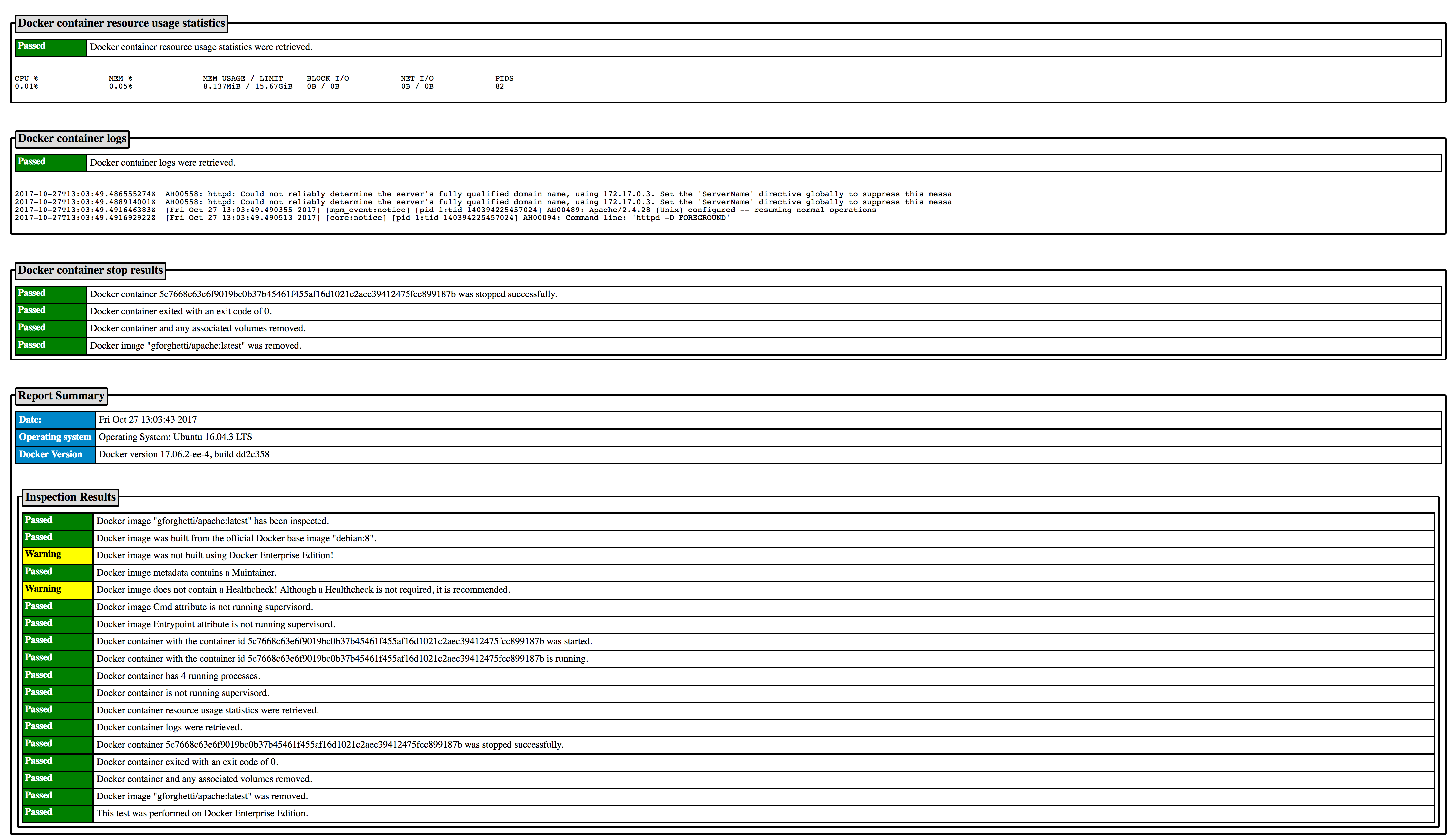
To inspect the Docker image, gforghetti/apache:latest, with HTML output:
root:[~/] # ./inspectDockerimage --html gforghetti/apache:latest
Note: The majority of the stdout message output has been intentionally omitted below.
Output:
The inspection of the Docker image gforghetti/apache:latest has completed.
An HTML report has been generated in the file html/gforghetti-apache-latest_inspection_report_2017-10-27_01-03-43.html
root:[~/] #
Image 1
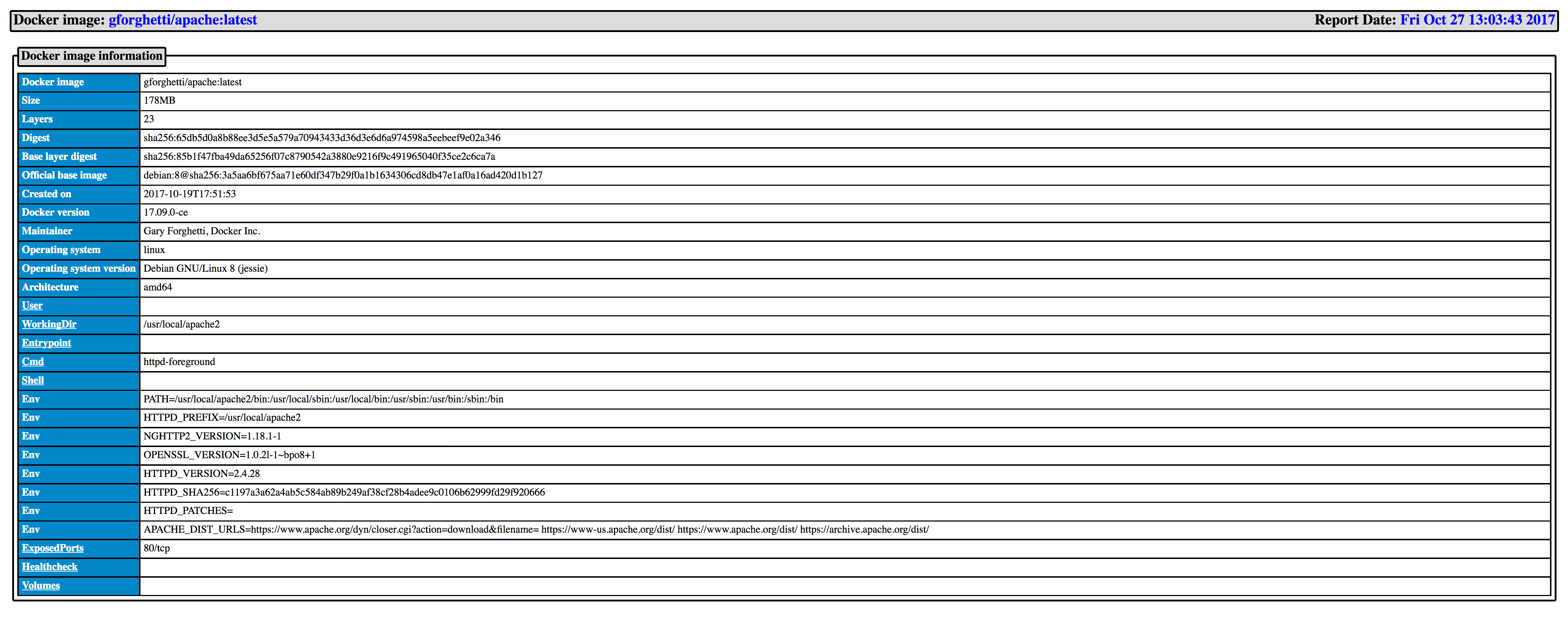
Image 2
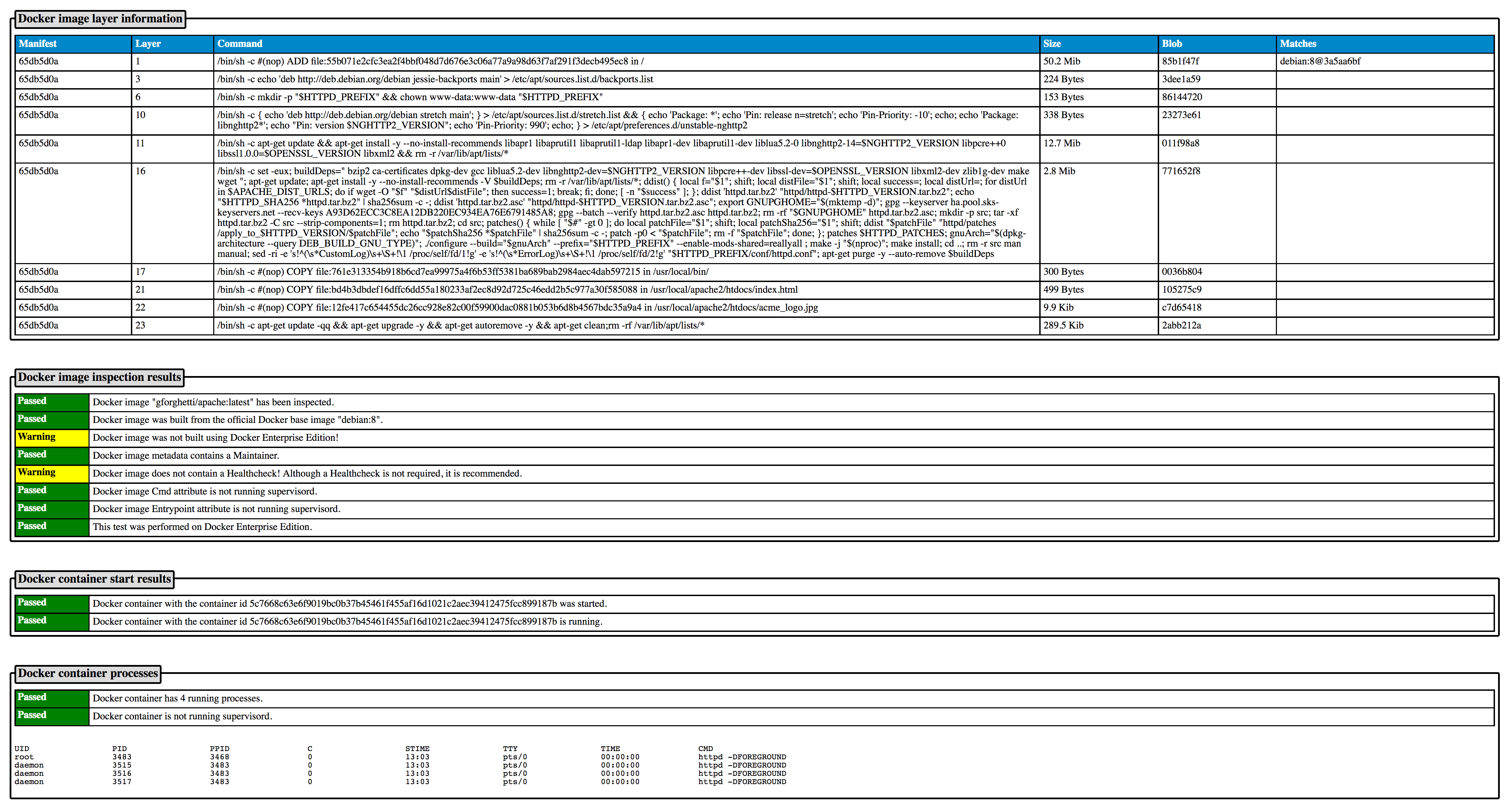
Image 3
Inspect a Microsoft Windows Docker image
To inspect the Docker image, microsoft/nanoserver:latest:
PS D:\InspectDockerimage> .\inspectDockerimage microsoft/nanoserver:latest
Output:
*******************************************************************************************************************************************************************************************************
* Docker image: microsoft/nanoserver:latest
*******************************************************************************************************************************************************************************************************

*******************************************************************************************************************************************************************************************************
* Step #1 Loading information on the Docker official base images ...
*******************************************************************************************************************************************************************************************************
The Docker official base images data has been loaded from the docker_official_base_images.json file. Last updated on Fri Oct 27 08:35:14 2017

*******************************************************************************************************************************************************************************************************
* Step #2 Inspecting the Docker image "microsoft/nanoserver:latest" ...
*******************************************************************************************************************************************************************************************************
Pulling the Docker image microsoft/nanoserver:latest ...
Pulling the Docker image took 2m10.1332244s
Passed:  Docker image "microsoft/nanoserver:latest" has been inspected.

*******************************************************************************************************************************************************************************************************
* Step #3 Docker image information
*******************************************************************************************************************************************************************************************************
+---------------------------+-------------------------------------------------------------------------------------------------------------------------------------------------------------------------+
| Docker image:             | microsoft/nanoserver:latest                                                                                                                                             |
| Size:                     | 1.07GB                                                                                                                                                                  |
| Layers:                   | 2                                                                                                                                                                       |
| Digest:                   | sha256:bea766f955b4e7e0c5d41654454629b81ef20d57df51709d61531d51d1cadec0                                                                                                 |
| Base layer digest:        | sha256:bce2fbc256ea437a87dadac2f69aabd25bed4f56255549090056c1131fad0277                                                                                                 |
| Official base image:      | golang:1.6.4-nanoserver@sha256:38890e2983bd2700145f1b4377ad8d826531a0a15fc68152b2478406f5ead6e2                                                                         |
| Created on:               | 2017-10-10T10:56:24                                                                                                                                                     |
| Docker version:           |                                                                                                                                                                         |
| Author:                   |                                                                                                                                                                         |
| Maintainer:               |                                                                                                                                                                         |
| Operating system:         | windows                                                                                                                                                                 |
| Operating system version: | Microsoft Windows Server 2016 Datacenter                                                                                                                                |
| Architecture:             | amd64                                                                                                                                                                   |
| User:                     |                                                                                                                                                                         |
| WorkingDir:               |                                                                                                                                                                         |
| Entrypoint:               |                                                                                                                                                                         |
| Cmd:                      | c:\windows\system32\cmd.exe                                                                                                                                             |
| Shell:                    |                                                                                                                                                                         |
| ExposedPorts:             |                                                                                                                                                                         |
| Healthcheck:              |                                                                                                                                                                         |
| Volumes:                  |                                                                                                                                                                         |
+---------------------------+-------------------------------------------------------------------------------------------------------------------------------------------------------------------------+

*******************************************************************************************************************************************************************************************************
* Step #4 Docker image layer information
*******************************************************************************************************************************************************************************************************
+----------+-------+------------------------------------------------------------------------------------------------------+------------+----------+---------------------------------------------------+
| Manifest | Layer | Command                                                                                              | Size       | Blob     | Matches                                           |
+----------+-------+------------------------------------------------------------------------------------------------------+------------+----------+---------------------------------------------------+
| bea766f9 | 1     | Apply image 10.0.14393.0                                                                             | 241 Mib    | bce2fbc2 | golang:1.6.4-nanoserver@38890e29                  |
| bea766f9 | 2     | Install update 10.0.14393.1770                                                                       | 135.2 Mib  | b0b5e40c |                                                   |
+----------+-------+------------------------------------------------------------------------------------------------------+------------+----------+---------------------------------------------------+

*******************************************************************************************************************************************************************************************************
* Step #5 Docker image inspection results
*******************************************************************************************************************************************************************************************************
Passed:  Docker image was built from the official Docker base image "golang:1.6.4-nanoserver".
Warning: Docker image was not built using Docker Enterprise Edition!
Warning: Docker image metadata does not contain an Author or Maintainer!
Warning: Docker image does not contain a Healthcheck! Although a Healthcheck is not required, it is recommended.

*******************************************************************************************************************************************************************************************************
* Step #6 Attempting to start a container from the Docker image "microsoft/nanoserver:latest" ...
*******************************************************************************************************************************************************************************************************
Passed:  Docker container with the container id 86ac470a17ca212f76d19a5242c0cd692e46c0305b3cba6d474d0e92a626e461 was started.

*******************************************************************************************************************************************************************************************************
* Step #7 Waiting 30 seconds to give the container time to initialize...
*******************************************************************************************************************************************************************************************************
Wait time expired, continuing.

*******************************************************************************************************************************************************************************************************
* Step #8 Checking to see if the container is still running.
*******************************************************************************************************************************************************************************************************
Passed:  Docker container with the container id 86ac470a17ca212f76d19a5242c0cd692e46c0305b3cba6d474d0e92a626e461 is running.

*******************************************************************************************************************************************************************************************************
* Step #9 Displaying the running processes in the Docker container
*******************************************************************************************************************************************************************************************************
Passed:  Docker container has 16 running processes.

Name                PID                 CPU                 Private Working Set
smss.exe            6056                00:00:00.015        221.2kB
csrss.exe           3172                00:00:00.015        356.4kB
wininit.exe         5872                00:00:00.015        659.5kB
services.exe        3352                00:00:00.109        1.442MB
lsass.exe           3632                00:00:00.156        2.859MB
svchost.exe         1484                00:00:00.031        1.335MB
svchost.exe         1560                00:00:00.015        1.356MB
svchost.exe         5220                00:00:00.031        2.109MB
svchost.exe         6096                00:00:00.015        1.425MB
svchost.exe         4704                00:00:00.062        3.76MB
svchost.exe         4936                00:00:00.046        2.044MB
svchost.exe         5740                00:00:00.046        1.716MB
svchost.exe         4504                00:00:00.468        4.506MB
CExecSvc.exe        4464                00:00:00.000        782.3kB
svchost.exe         4328                00:00:00.093        3.113MB
cmd.exe             5668                00:00:00.031        426kB

*******************************************************************************************************************************************************************************************************
* Step #10 Displaying Docker container resource usage statistics
*******************************************************************************************************************************************************************************************************
Passed:  Docker container resource usage statistics were retrieved.

CPU %               PRIV WORKING SET    BLOCK I/O           NET I/O
0.00%               26.81MiB            5.1MB / 14.2MB      79.4kB / 7.24kB

*******************************************************************************************************************************************************************************************************
* Step #11 Displaying the logs from the Docker container (last 20 lines)
*******************************************************************************************************************************************************************************************************
Passed:  Docker container logs were retrieved.

2017-10-27T13:27:28.268812200Z  (c) 2016 Microsoft Corporation. All rights reserved.
2017-10-27T13:27:28.269808900Z

*******************************************************************************************************************************************************************************************************
* Step #12 Attempting to stop the Docker container normally with a timeout of 60 seconds before it is killed ...
*******************************************************************************************************************************************************************************************************
Passed:  Docker container 86ac470a17ca212f76d19a5242c0cd692e46c0305b3cba6d474d0e92a626e461 was stopped successfully.
Passed:  Docker container exited with an exit code of 0.

*******************************************************************************************************************************************************************************************************
* Step #13 Removing the Docker container and any associated volumes.
*******************************************************************************************************************************************************************************************************
Passed:  Docker container and any associated volumes removed.

*******************************************************************************************************************************************************************************************************
* Step #14 Removing the Docker image "microsoft/nanoserver:latest".
*******************************************************************************************************************************************************************************************************
Passed:  Docker image "microsoft/nanoserver:latest" was removed.
Passed:  This test was performed on Docker Enterprise Edition.

*******************************************************************************************************************************************************************************************************
* Summary of the inspection for Docker image: microsoft/nanoserver:latest
*******************************************************************************************************************************************************************************************************

Date: Fri Oct 27 13:25:00 2017
Operating System: Microsoft Windows Server 2016 Datacenter
Docker version 17.06.1-ee-2, build 8e43158

There were 3 warnings detected!

Passed:  Docker image "microsoft/nanoserver:latest" has been inspected.
Passed:  Docker image was built from the official Docker base image "golang:1.6.4-nanoserver".
Warning: Docker image was not built using Docker Enterprise Edition!
Warning: Docker image metadata does not contain an Author or Maintainer!
Warning: Docker image does not contain a Healthcheck! Although a Healthcheck is not required, it is recommended.
Passed:  Docker container with the container id 86ac470a17ca212f76d19a5242c0cd692e46c0305b3cba6d474d0e92a626e461 was started.
Passed:  Docker container with the container id 86ac470a17ca212f76d19a5242c0cd692e46c0305b3cba6d474d0e92a626e461 is running.
Passed:  Docker container has 16 running processes.
Passed:  Docker container resource usage statistics were retrieved.
Passed:  Docker container logs were retrieved.
Passed:  Docker container 86ac470a17ca212f76d19a5242c0cd692e46c0305b3cba6d474d0e92a626e461 was stopped successfully.
Passed:  Docker container exited with an exit code of 0.
Passed:  Docker container and any associated volumes removed.
Passed:  Docker image "microsoft/nanoserver:latest" was removed.
Passed:  This test was performed on Docker Enterprise Edition.

The inspection of the Docker image microsoft/nanoserver:latest has completed.

PS D:\InspectDockerimage>