4.0 KiB
| title | description | keywords |
|---|---|---|
| SAML integration | Learn how to use SAML to link a UCP team with an Identity Provider (IdP) Group | cluster, node, join |
SAML integration
Typical steps involved in SAML integration:
- Configure IdP.
- Enable SAML and configure UCP as the Service Provider in Admin Settings -> Authentication and Authorization.
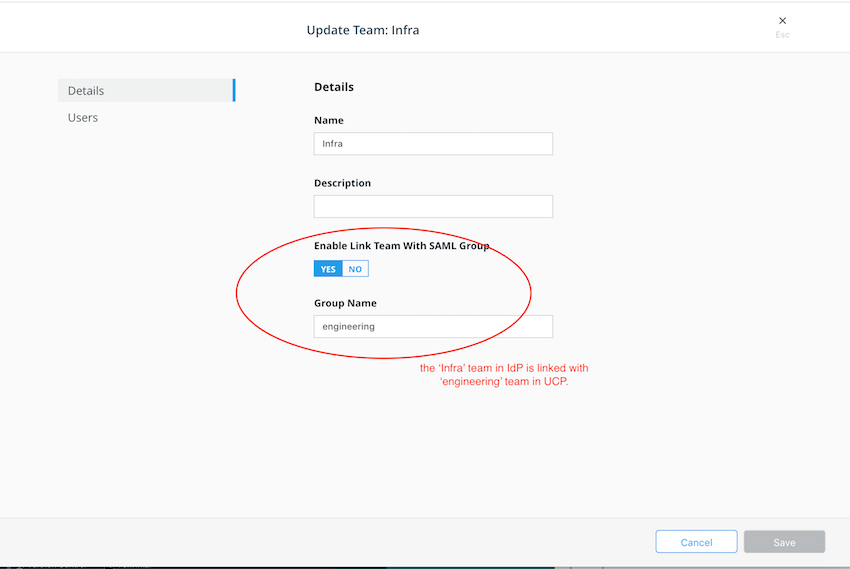
- Create (Edit) Teams to link with the Group memberships. This updates team membership information when a user signs in with SAML.
Configure IdP:
Service Provider metadata is available at https://<SP Host>/enzi/v0/saml/metadata
after SAML is enabled. The metadata link is also labeled as entityID.
Note: Only
POSTbinding is supported for the 'Assertion Consumer Service', which is located athttps://<SP Host>/enzi/v0/saml/acs.
Enable SAML and configure UCP
After UCP sends an AuthnRequest to the IdP, the following Assertion
is expected:
Subjectincludes aNameIDthat is identified as the UCP username. InAuthnRequest,NameIDFormatis set tourn:oasis:names:tc:SAML:1.1:nameid-format:unspecified. This allows maximum compatibility for various Identity Providers.
<saml2:Subject>
    <saml2:NameID Format="urn:oasis:names:tc:SAML:1.1:nameid-format:unspecified">ry4nz</saml2:NameID>
    <saml2:SubjectConfirmation Method="urn:oasis:names:tc:SAML:2.0:cm:bearer">
        <saml2:SubjectConfirmationData NotOnOrAfter="2018-09-10T20:04:48.001Z" Recipient="https://18.237.224.122/enzi/v0/saml/acs"/>
    </saml2:SubjectConfirmation>
</saml2:Subject>
- Optional
Attributenamedfullnameis mapped to the Full Name field in the UCP account.
Note: UCP uses the value of the first occurrence of an
AttributewithName="fullname"as the Full Name.
<saml2:Attribute Name="fullname" NameFormat="urn:oasis:names:tc:SAML:2.0:attrname-format:unspecified">
    <saml2:AttributeValue
        xmlns:xs="http://www.w3.org/2001/XMLSchema"
        xmlns:xsi="http://www.w3.org/2001/XMLSchema-instance" xsi:type="xs:string">user.displayName
    </saml2:AttributeValue>
</saml2:Attribute>
- Optional
Attributenamedmember-ofis linked to the UCP team. Values are set in the UCP interface.
Note: UCP uses all
AttributeStatementsandAttributesin theAssertionwithName="member-of".
<saml2:Attribute Name="member-of" NameFormat="urn:oasis:names:tc:SAML:2.0:attrname-format:unspecified">
    <saml2:AttributeValue
        xmlns:xs="http://www.w3.org/2001/XMLSchema"
        xmlns:xsi="http://www.w3.org/2001/XMLSchema-instance" xsi:type="xs:string">groupName
    </saml2:AttributeValue>
</saml2:Attribute>
- Optional
Attributenamedis-admindetermines if the user is an administrator. The content in theAttributeValueis ignored.
<saml2:Attribute Name="is-admin" NameFormat="urn:oasis:names:tc:SAML:2.0:attrname-format:unspecified">
    <saml2:AttributeValue
        xmlns:xs="http://www.w3.org/2001/XMLSchema"
        xmlns:xsi="http://www.w3.org/2001/XMLSchema-instance" xsi:type="xs:string">value_doe_not_matter
    </saml2:AttributeValue>
</saml2:Attribute>
Okta Configuration
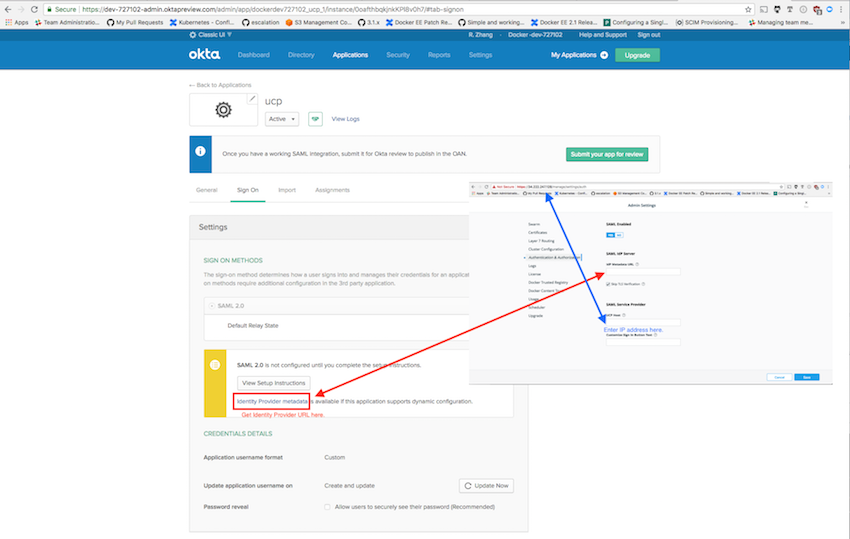
Configuring with Okta is straightforward, as shown in the following examples:
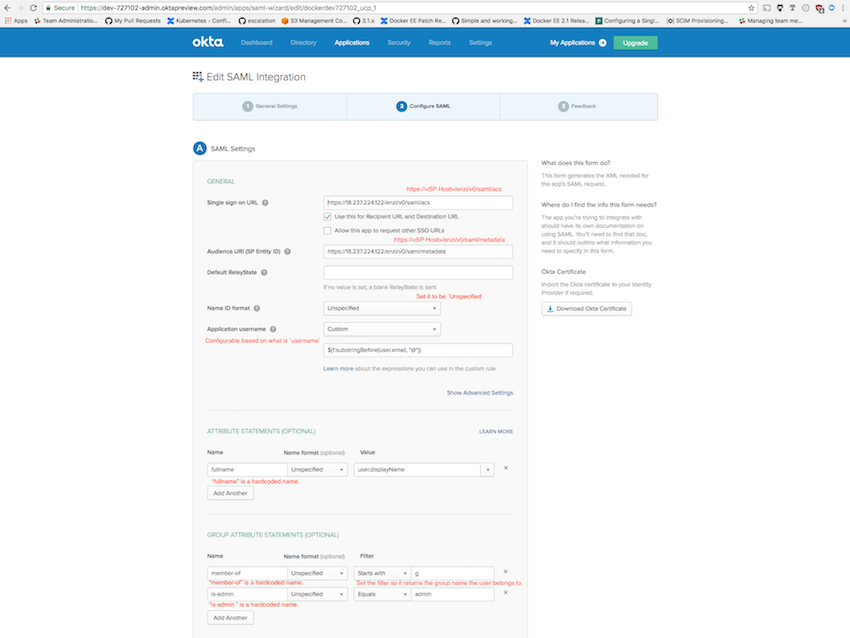
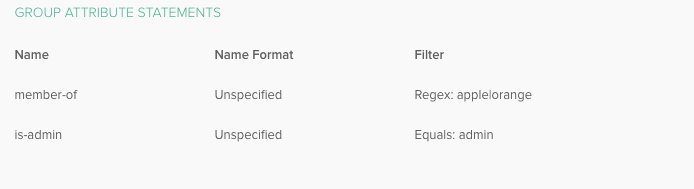
When two or more group names are expected to return with the Assertion, use the regex filter. For example, use the value apple|orange
to return groups apple and orange.
Service Provider Configuration
Enter the Identity Provider's metadata URL to obtain its metadata. To access the URL, you might need to provide the CA certificate that can verify the remote server.
Link Group memeberships with users
Use the 'edit' or 'create' team dialog to associate SAML group assertion with
the UCP team so that user team membership is synchronized when the user logs in.