|
…
|
||
|---|---|---|
| .. | ||
| codelabs | ||
| examples | ||
| tools | ||
| .gitignore | ||
| README.md | ||
README.md
TensorFlow Lite sample applications
The following samples demonstrate the use of TensorFlow Lite in mobile applications. Each sample is written for both Android and iOS.
Image classification
This app performs image classification on a live camera feed and displays the inference output in realtime on the screen.
Samples
Raspberry Pi image classification
Object detection
This app performs object detection on a live camera feed and displays the results in realtime on the screen. The app displays the confidence scores, classes and detected bounding boxes for multiple objects. A detected object is only displayed if the confidence score is greater than a defined threshold.
Samples
Speech command recognition
This application recognizes a set of voice commands using the device's microphone input. When a command is spoken, the corresponding class in the app is highlighted.
Samples
Gesture classification
This app uses a model to classify and recognize different gestures. A model is trained on webcam data captured using a web interface. The model is then converted to a TensorFlow Lite model and used to classify gestures in a mobile application.
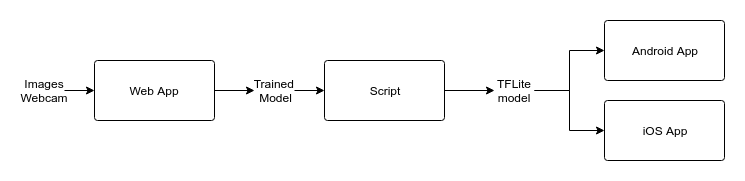
Web app
First, we use TensorFlow.js embedded in a web interface to collect the data required to train the model. We then use TensorFlow.js to train the model.
Conversion script
The model downloaded from the web interface is converted to a TensorFlow Lite model.
Conversion script (available as a Colab notebook).
Mobile apps
Once we have the TensorFlow Lite model, the implementation is very similar to the Image classification sample.
Samples
Android gesture classification
Model personalization
This app performs model personalization on a live camera feed and displays the results in realtime on the screen. The app displays the confidence scores, classes and detected bounding boxes for multiple objects that were trained in realtime.