mirror of https://github.com/kubeflow/examples.git
349 lines
13 KiB
Markdown
349 lines
13 KiB
Markdown
# Objective
|
||
|
||
This example is based on the Bluebook for bulldozers competition (https://www.kaggle.com/competitions/bluebook-for-bulldozers/overview). The objective of this exercise is to predict the sale price of bulldozers sold at auctions.
|
||
|
||
## Environment
|
||
|
||
This pipeline was tested using Kubeflow 1.4 and kfp 1.1.2 and x86-64 and ARM based system which includes all Intel and AMD based CPU's and M1/M2 series Macbooks.
|
||
|
||
## Step 1: Setup Kubeflow as a Service
|
||
|
||
- If you haven’t already, sign up (https://www.arrikto.com/kubeflow-as-a-service/)
|
||
- Deploy Kubeflow
|
||
|
||
## Step 2: Launch a Notebook Server
|
||
|
||
- Bump memory to 2GB and vCPUs to 2
|
||
|
||
|
||
## Step 3: Clone the Project Repo to Your Notebook
|
||
|
||
- (Kubeflow as a Service) Open up a terminal in the Notebook Server and git clone the kubeflow/examples repository
|
||
```
|
||
git clone https://github.com/kubeflow/examples
|
||
```
|
||
|
||
## Step 4: Setup DockerHub and Docker
|
||
|
||
- If you haven’t already, sign up (https://hub.docker.com/) for DockerHub
|
||
- If you haven’t already, install Docker Desktop (https://www.docker.com/products/docker-desktop/) locally OR install the Docker command line utility (https://docs.docker.com/get-docker/) and enter `sudo docker login` command in your terminal and log into Docker with your your DockerHub username and password
|
||
|
||
|
||
## Step 5: Setup Kaggle
|
||
|
||
- If you haven’t already done so, sign up (https://www.kaggle.com/) for Kaggle
|
||
- (On Kaggle) Generate an API token (https://www.kaggle.com/docs/api)
|
||
- (Kubeflow as a Service) Create a Kubernetes secret
|
||
```
|
||
kubectl create secret generic kaggle-secret --from-literal=KAGGLE_USERNAME=<username> --from-literal=KAGGLE_KEY=<api_token>
|
||
```
|
||
|
||
## Step 6: Install Git
|
||
|
||
- (Locally) If you don’t have it already, install Git (https://github.com/git-guides/install-git)
|
||
|
||
## Step 7: Clone the Project Repo Locally
|
||
|
||
- (Locally) Git clone the `kubeflow/examples` repository
|
||
```
|
||
git clone https://github.com/kubeflow/examples
|
||
```
|
||
|
||
## Step 8: Create a PodDefault Resource
|
||
|
||
- (Kubeflow as a Service) Navigate to the `bluebook-for-bulldozers-kaggle-competition directory`
|
||
- Create a resource.yaml file
|
||
|
||
resource.yaml:
|
||
```
|
||
apiVersion: "kubeflow.org/v1alpha1"
|
||
kind: PodDefault
|
||
metadata:
|
||
name: kaggle-access
|
||
spec:
|
||
selector:
|
||
matchLabels:
|
||
kaggle-secret: "true"
|
||
desc: "kaggle-access"
|
||
volumeMounts:
|
||
- name: secret-volume
|
||
mountPath: /secret/kaggle
|
||
volumes:
|
||
- name: secret-volume
|
||
secret:
|
||
secretName: kaggle-secret
|
||
```
|
||
|
||
<img width="660" alt="image3" src="https://user-images.githubusercontent.com/17012391/177049116-b4186ec3-becb-40ea-973a-27bc52f90619.png">
|
||
|
||
- Apply resource.yaml using `kubectl apply -f resource.yaml`
|
||
|
||
## Step 9: Explore the load-data directory
|
||
|
||
- (Locally) Navigate to the `bluebook-for-bulldozers-kaggle-competition/pipeline-components/load-data` directory
|
||
- Open up the `load.py` file
|
||
- Note the code in this file that will perform the actions required in the “load-data” pipeline step
|
||
|
||
<img width="209" alt="image7" src="https://user-images.githubusercontent.com/17012391/177049222-dab4c362-f06d-42ca-a07c-e61a0b301670.png">
|
||
|
||
## Step 10: Build the load Docker Image
|
||
|
||
- (Locally) Navigate to the bluebook-for-bulldozers-kaggle-competition/pipeline-components/load-data directory
|
||
- Build the Docker image if locally you are using arm64 (Apple M1)
|
||
```
|
||
docker build --platform=linux/amd64 -t <docker_username>/<docker_imagename>:<tag>-amd64 .
|
||
```
|
||
- OR build the Docker image if locally you are using amd64
|
||
```
|
||
docker build -t <docker_username>/<docker_imagename>:<tag> .
|
||
```
|
||
|
||
## Step 11: Push the load Docker Image to DockerHub
|
||
|
||
- (Locally) Navigate to the `bluebook-for-bulldozers-kaggle-competition/pipeline-components/load-data` directory
|
||
- Push the Docker image if locally you are using arm64 (Apple M1)
|
||
```
|
||
docker push <docker_username>/<docker_imagename>:<tag>-amd64
|
||
```
|
||
- OR build the Docker image if locally you are using amd64
|
||
```
|
||
docker push <docker_username>/<docker_imagename>:<tag>
|
||
```
|
||
|
||
## Step 12: Explore the preprocess directory
|
||
|
||
- (Locally) Navigate to the `bluebook-for-bulldozers-kaggle-competition/pipeline-components/preprocess` directory
|
||
- Open up the `preprocess.py` file
|
||
- Note the code in this file that will perform the actions required in the “preprocess” pipeline step
|
||
|
||
<img width="209" alt="image5" src="https://user-images.githubusercontent.com/17012391/177049651-623fb24a-69c0-4a28-bbe1-3a360719b9ce.png">
|
||
|
||
## Step 13: Build the preprocess Docker Image
|
||
|
||
- (Locally) Navigate to the `bluebook-for-bulldozers-kaggle-competition/pipeline-components/preprocess` directory
|
||
- Build the Docker image if locally you are using arm64 (Apple M1)
|
||
```
|
||
docker build --platform=linux/amd64 -t <docker_username>/<docker_imagename>:<tag>-amd64 .
|
||
```
|
||
- OR build the Docker image if locally you are using amd64
|
||
```
|
||
docker build -t <docker_username>/<docker_imagename>:<tag> .
|
||
```
|
||
## Step 14: Push the preprocess Docker Image to DockerHub
|
||
|
||
- (Locally) Navigate to the `bluebook-for-bulldozers-kaggle-competition/pipeline-components/preprocess` directory
|
||
- Push the Docker image if locally you are using arm64 (Apple M1)
|
||
```
|
||
docker push <docker_username>/<docker_imagename>:<tag>-amd64
|
||
```
|
||
- OR build the Docker image if locally you are using amd64
|
||
```
|
||
docker push <docker_username>/<docker_imagename>:<tag>
|
||
```
|
||
|
||
## Step 15: Explore the train directory
|
||
|
||
- (Locally) Navigate to the `bluebook-for-bulldozers-kaggle-competition/pipeline-components/train` directory
|
||
- Open up the train.py file
|
||
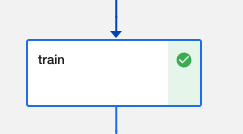
- Note the code in this file that will perform the actions required in the “train” pipeline step
|
||
|
||
|
||
|
||
|
||
## Step 16: Build the train Docker Image
|
||
|
||
- (Locally) Navigate to the `bluebook-for-bulldozers-kaggle-competition/pipeline-components/train` directory
|
||
- Build the Docker image if locally you are using arm64 (Apple M1)
|
||
```
|
||
docker build --platform=linux/amd64 -t <docker_username>/<docker_imagename>:<tag>-amd64 .
|
||
```
|
||
- OR build the Docker image if locally you are using amd64
|
||
```
|
||
docker build -t <docker_username>/<docker_imagename>:<tag> .
|
||
```
|
||
|
||
## Step 17: Push the train Docker Image to DockerHub
|
||
|
||
- (Locally) Navigate to the bluebook-for-bulldozers-kaggle-competition/pipeline-components/train directory
|
||
- Push the Docker image if locally you are using arm64 (Apple M1)
|
||
```
|
||
docker push <docker_username>/<docker_imagename>:<tag>-amd64
|
||
```
|
||
- OR build the Docker image if locally you are using amd64
|
||
```
|
||
docker push <docker_username>/<docker_imagename>:<tag>
|
||
```
|
||
|
||
## Step 18: Explore the test directory
|
||
|
||
- (Locally) Navigate to the `bluebook-for-bulldozers-kaggle-competition/pipeline-components/test` directory
|
||
- Open up the `test.py` file
|
||
- Note the code in this file that will perform the actions required in the “test” pipeline step
|
||
|
||
<img width="237" alt="image6" src="https://user-images.githubusercontent.com/17012391/177051308-31b27ad7-71f3-47af-a068-de381fe64b5b.png">
|
||
|
||
## Step 19: Build the test Docker Image
|
||
|
||
- (Locally) Navigate to the `bluebook-for-bulldozers-kaggle-competition/pipeline-components/test` directory
|
||
- Build the Docker image if locally you are using arm64 (Apple M1)
|
||
```
|
||
docker build --platform=linux/amd64 -t <docker_username>/<docker_imagename>:<tag>-amd64 .
|
||
```
|
||
- OR build the Docker image if locally you are using amd64
|
||
```
|
||
docker build -t <docker_username>/<docker_imagename>:<tag> .
|
||
```
|
||
## Step 20: Push the test Docker Image to DockerHub
|
||
|
||
- (Locally) Navigate to the `bluebook-for-bulldozers-kaggle-competition/pipeline-components/test` directory
|
||
- Push the Docker image if locally you are using arm64 (Apple M1)
|
||
```
|
||
docker push <docker_username>/<docker_imagename>:<tag>-amd64
|
||
```
|
||
- OR build the Docker image if locally you are using amd64
|
||
```
|
||
docker push <docker_username>/<docker_imagename>:<tag>
|
||
```
|
||
|
||
## Step 21: Modify the blue-book-for-bulldozers-kfp.py file
|
||
|
||
(Kubeflow as a Service) Navigate to the `bluebook-for-bulldozers-kaggle-competition` directory
|
||
Update the `bluebook-for-bulldozers-kaggle-competition-kfp.py` with accurate Docker Image inputs
|
||
|
||
```
|
||
return dsl.ContainerOp(
|
||
name = 'load-data',
|
||
image = '<dockerhub username>/<image name>:<tag>',
|
||
|
||
—-----
|
||
|
||
def PreProcess(comp1):
|
||
return dsl.ContainerOp(
|
||
name = 'preprocess',
|
||
image = '<dockerhub username>/<image name>:<tag>',
|
||
|
||
—-----
|
||
|
||
def Train(comp2):
|
||
return dsl.ContainerOp(
|
||
name = 'train',
|
||
image = '<dockerhub username>/<image name>:<tag>',
|
||
|
||
—-----
|
||
|
||
def Test(comp3):
|
||
return dsl.ContainerOp(
|
||
name = 'test',
|
||
image = '<dockerhub username>/<image name>:<tag>',
|
||
|
||
```
|
||
|
||
## Step 22: Generate a KFP Pipeline yaml File
|
||
|
||
- (Locally) Navigate to the `bluebook-for-bulldozers-kaggle-competition` directory and delete the existing `blue-book-for-bulldozers-kaggle-competition-kfp.yaml` file
|
||
- (Kubeflow as a Service) Navigate to the `bluebook-for-bulldozers-kaggle-competition` directory
|
||
|
||
Build a python virtual environment:
|
||
|
||
Step a) Update pip
|
||
```
|
||
python3 -m pip install --upgrade pip
|
||
```
|
||
|
||
Step b) Install virtualenv
|
||
```
|
||
sudo pip3 install virtualenv
|
||
```
|
||
|
||
Step c) Check the installed version of venv
|
||
```
|
||
virtualenv --version
|
||
```
|
||
|
||
Step d) Name your virtual enviornment as kfp
|
||
```
|
||
virtualenv kfp
|
||
```
|
||
|
||
Step e) Activate your venv.
|
||
```
|
||
source kfp/bin/activate
|
||
```
|
||
|
||
After this virtual environment will get activated. Now in our activated venv we need to install following packages:
|
||
```
|
||
sudo apt-get update
|
||
sudo apt-get upgrade
|
||
sudo apt-get install -y git python3-pip
|
||
|
||
python3 -m pip install kfp==1.1.2
|
||
```
|
||
|
||
After installing packages create the yaml file
|
||
|
||
Inside venv point your terminal to a path which contains our kfp file to build pipeline (blue-book-for-bulldozers-kaggle-competition-kfp.py) and run these commands to generate a `yaml` file for the Pipeline:
|
||
|
||
```
|
||
blue-book-for-bulldozers-kaggle-competition-kfp.py
|
||
```
|
||
|
||
<img width="496" alt="Screenshot 2022-07-04 at 12 01 51 AM" src="https://user-images.githubusercontent.com/17012391/177052742-4dae4647-b51b-4f36-94b0-3114130c756b.png">
|
||
|
||
- Download the `bluebook-for-bulldozers-kaggle-competition.yaml` file that was created to your local `bluebook-for-bulldozers-kaggle-competition` directory
|
||
|
||
## Step 23: Create an Experiment
|
||
|
||
- (Kubeflow as a Service) Within the Kubeflow Central Dashboard, navigate to the Experiments (KFP) > Create Experiment view
|
||
- Name the experiment and click Next
|
||
- Click on Experiments (KFP) to view the experiment you just created
|
||
|
||
## Step 24: Create a Pipeline
|
||
|
||
- (Kubeflow as a Service) Within the Kubeflow Central Dashboard, navigate to the Pipelines > +Upload Pipeline view
|
||
- Name the pipeline
|
||
- Click on Upload a file
|
||
- Upload the local bluebook-for-bulldozers-kaggle-competition.py.yaml file
|
||
- Click Create
|
||
|
||
Step 25: Create a Run
|
||
|
||
- (Kubeflow as a Service) Click on Create Run in the view from the previous step
|
||
- Choose the experiment we created in Step 23
|
||
- Click Start
|
||
- Click on the run name to view the runtime execution graph
|
||
|
||
<img width="285" alt="Screenshot 2022-07-04 at 12 04 43 AM" src="https://user-images.githubusercontent.com/17012391/177052835-d2cde097-7354-4cac-8876-7d89244864d3.png">
|
||
|
||
|
||
## Troubleshooting Tips:
|
||
While running the pipeline as mentioned above you may come across this error:
|
||

|
||
|
||
errorlog:
|
||
|
||
```
|
||
kaggle.rest.ApiException: (403)
|
||
Reason: Forbidden
|
||
HTTP response headers: HTTPHeaderDict({'Content-Type': 'application/json', 'Date': 'Thu, 23 Jun 2022 11:31:18 GMT', 'Access-Control-Allow-Credentials': 'true', 'Set-Cookie': 'ka_sessionid=6817a347c75399a531148e19cad0aaeb; max-age=2626560; path=/, GCLB=CIGths3--ebbUg; path=/; HttpOnly', 'Transfer-Encoding': 'chunked', 'Vary':
|
||
HTTP response body: b'{"code":403,"message":"You must accept this competition\\u0027s rules before you\\u0027ll be able to download files."}'
|
||
|
||
```
|
||
This error occours for two reasons:
|
||
- Your Kaggle account is not verified with your phone number.
|
||
- Rules for this specific competitions are not accepted.
|
||
|
||
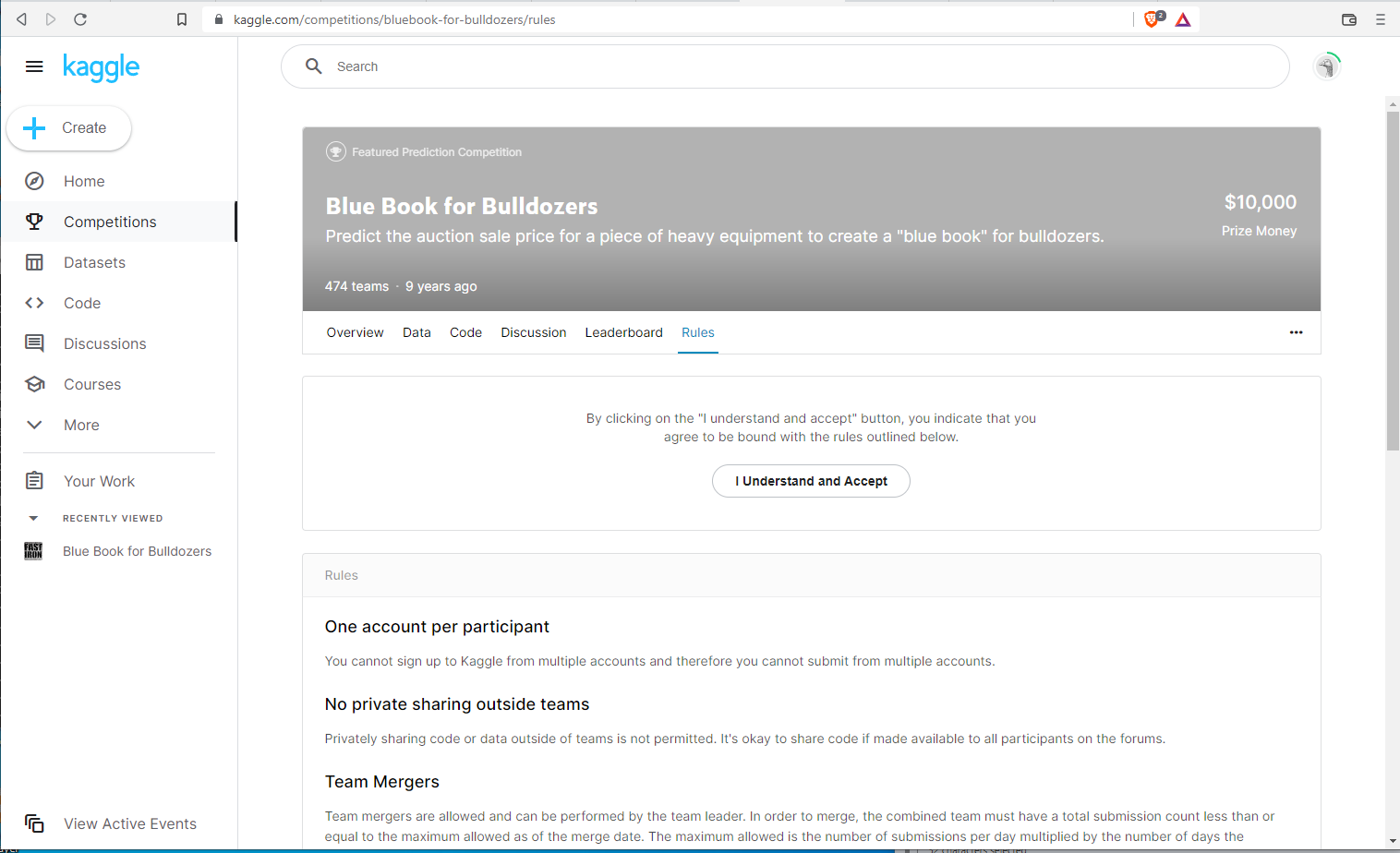
Lets accept Rules of Bulldozers competition
|
||
|
||
|
||
Click on "I Understand and Accept". After this you will be prompted to verify your account using your phone number:
|
||

|
||
|
||
Add your phone number and Kaggle will send the code to your number, enter this code and verify your account. ( Note: pipeline wont run if your Kaggle account is not verified )
|
||
|
||
## Success
|
||
After the kaggle account is verified pipeline run is successful we will get the following:
|
||
|
||
<img width="1380" alt="Screenshot 2022-06-10 at 12 04 48 AM" src="https://user-images.githubusercontent.com/17012391/172920115-ccefd333-c500-4577-afcb-8487c2208371.png">
|
||
|
||
|