118 lines
4.9 KiB
Markdown
118 lines
4.9 KiB
Markdown
---
|
|
title: Provision a Database and Import a SQL File for initialization
|
|
---
|
|
|
|
This tutorial will talk about how to provision a relational database with SQL file imported, and bootstrap an
|
|
application which depends on the database.
|
|
|
|
[Favorite Links](https://github.com/kubevela-contrib/nodejs-mysql-links) is an interesting project which can store all
|
|
your favorite web links in one application. It is using Node.js and MySQL. It has been built into a container image
|
|
`oamdev/nodejs-mysql-links:v0.0.1`. Let's bootstrap the application and see how to provision a database, and import a SQL
|
|
file (which means to create tables, and insert data into them if needed).
|
|
|
|
> Currently, it only works on Alibaba Cloud
|
|
> ComponentDefinition [alibaba-rds-preview](https://github.com/kubevela/catalog/blob/master/addons/terraform-alibaba/definitions/terraform-alibaba-rds-preview.yaml) is the feature preview for Alibaba Cloud RDS, and will be merged into alibaba-rds later.
|
|
|
|
### How it works
|
|
|
|
> Feel free to skip this section if you are not interested.
|
|
|
|
Alibaba Cloud RDS Preview supports importing SQL file when create an RDS instance with these properties:
|
|
|
|
| Name | Description | Type | Required | Default |
|
|
|---------------------|-----------------------------------------------------------------|--------|----------|---------|
|
|
| sql_file | The name of SQL file in the bucket, like `db.sql` | string | false | |
|
|
| sql_bucket_name | The bucket name of the SQL file. like `oss://example` | string | false | |
|
|
| sql_bucket_endpoint | The endpoint of the bucket. like `oss-cn-hangzhou.aliyuncs.com` | string | false | |
|
|
|
|
After an RDS database is created, the SQL file from OSS bucket will be imported into the database by the power of Terraform
|
|
[`local-exec` provisioner](https://github.com/kubevela-contrib/terraform-modules/blob/master/alibaba/rds-preview/main.tf#L24-L33)
|
|
which is referenced by [Alibaba Cloud RDS Preview ComponentDefinition](https://github.com/kubevela/catalog/blob/master/addons/terraform-alibaba/definitions/terraform-alibaba-rds-preview.yaml#L23-L25).
|
|
|
|
### Prerequisites
|
|
|
|
- Enable addon [terraform-alibaba](../../../reference/addons/terraform)
|
|
|
|
- Remember to store the SQL file in an [Alibaba Cloud OSS bucket](./terraform/alibaba-oss)
|
|
|
|
Let's say we have an OSS bucket `oss://favorite-links` which contains a SQL file `db.sql` in it, and the bucket endpoint
|
|
is `oss-cn-hongkong.aliyuncs.com`.
|
|
|
|
### Provision cloud resources
|
|
|
|
Use the following Application to provision a database `links`, import the SQL file `db.sql`, and bootstrap the application
|
|
Favorite Links.
|
|
|
|
```yaml
|
|
apiVersion: core.oam.dev/v1beta1
|
|
kind: Application
|
|
metadata:
|
|
name: favorite-links
|
|
spec:
|
|
components:
|
|
- name: web
|
|
type: webservice
|
|
properties:
|
|
image: oamdev/nodejs-mysql-links:v0.0.1
|
|
port: 4000
|
|
traits:
|
|
- type: service-binding
|
|
properties:
|
|
envMappings:
|
|
DATABASE_HOST:
|
|
secret: db-conn
|
|
key: DB_PUBLIC_HOST
|
|
DATABASE_NAME:
|
|
secret: db-conn
|
|
key: DATABASE_NAME
|
|
DATABASE_USER:
|
|
secret: db-conn
|
|
key: DB_USER
|
|
DATABASE_PASSWORD:
|
|
secret: db-conn
|
|
key: DB_PASSWORD
|
|
|
|
- name: db
|
|
type: alibaba-rds
|
|
properties:
|
|
instance_name: favorite-links
|
|
database_name: links
|
|
account_name: oamtest
|
|
password: U34rfwefwefffaked
|
|
security_ips: [ "0.0.0.0/0" ]
|
|
privilege: ReadWrite
|
|
sql_file: db.sql
|
|
sql_bucket_endpoint: oss-cn-hongkong.aliyuncs.com
|
|
sql_bucket_name: oss://favorite-links
|
|
writeConnectionSecretToRef:
|
|
name: db-conn
|
|
|
|
```
|
|
|
|
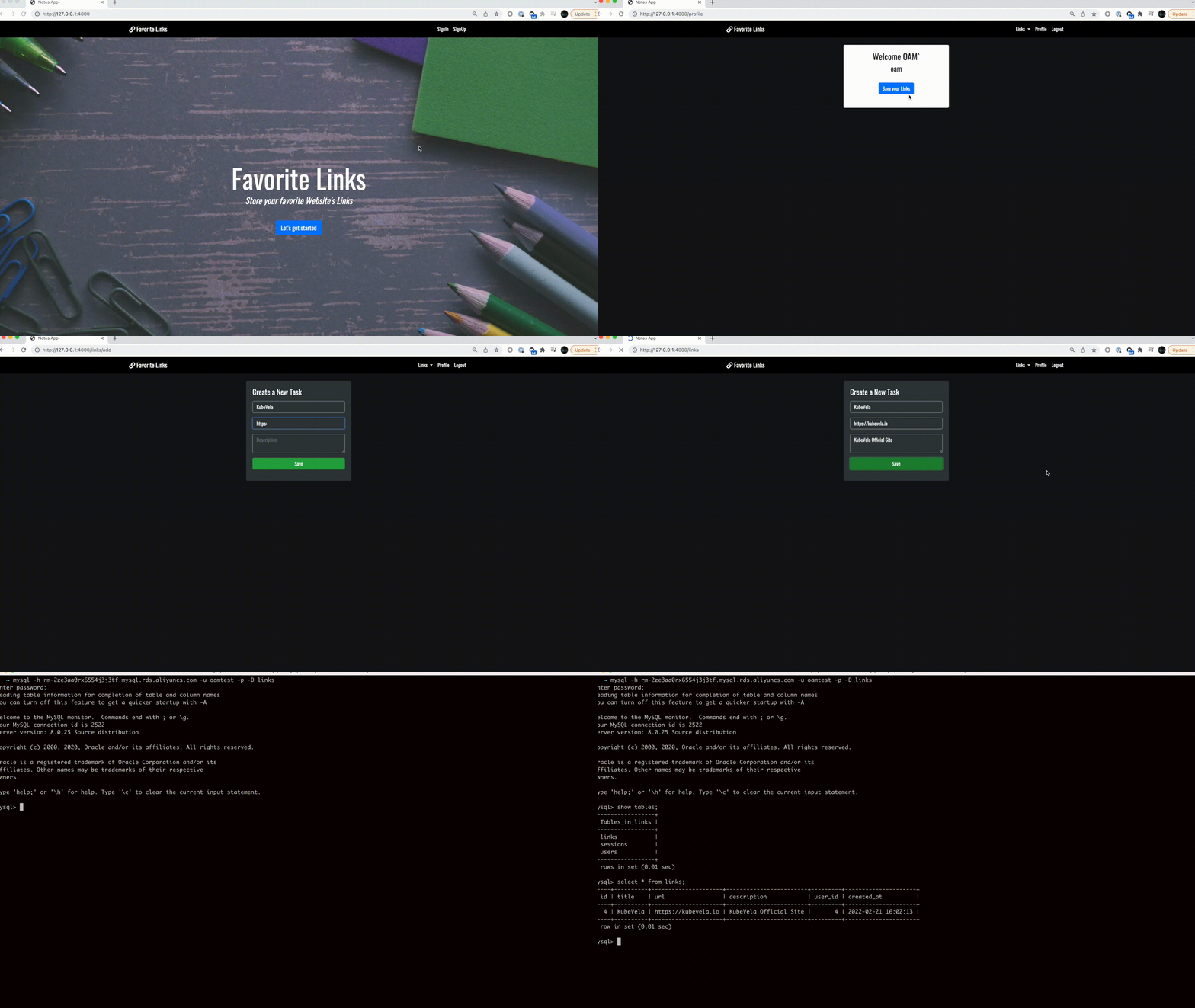
After the application is successfully deployed, you can access the web application by the following URL:
|
|
|
|
```shell
|
|
$ vela ls
|
|
APP COMPONENT TYPE TRAITS PHASE HEALTHY STATUS CREATED-TIME
|
|
favorite-links web webservice service-binding running healthy Ready:1/1 2022-02-21 14:15:45 +0800 CST
|
|
└─ db alibaba-rds-preview running healthy Cloud resources are deployed and ready to use 2022-02-21 14:15:45 +0800 CST
|
|
|
|
```
|
|
|
|
```shell
|
|
$ vela port-forward favorite-links 4000:4000
|
|
Forwarding from 127.0.0.1:4000 -> 4000
|
|
Forwarding from [::1]:4000 -> 4000
|
|
|
|
Forward successfully! Opening browser ...
|
|
Handling connection for 4000
|
|
Handling connection for 4000
|
|
```
|
|
|
|
|
|
|
|
## Next
|
|
|
|
- [Secure your Database Connection](./secure-your-database-connection)
|
|
- [Provision an RDS instance with more than one database](./provision-an-RDS-instance-with-more-than-one-database)
|